


MD326 3D Modern Watch Face
4.6239.00 Reviews
App Specs
- Version
- Varies with Device
- Updated On
- License
- $2.49
- Downloads
- 50,000+
- Developer
- Matteo Dini MD ® Watch Faces
- Categories
- Personalization
- Platform
- Android
Screenshots
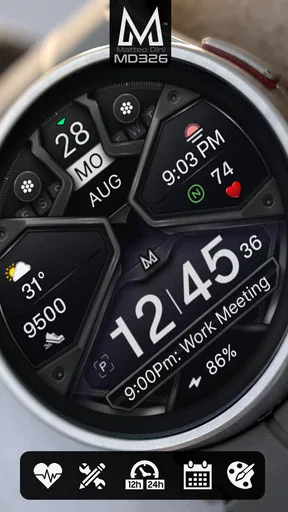
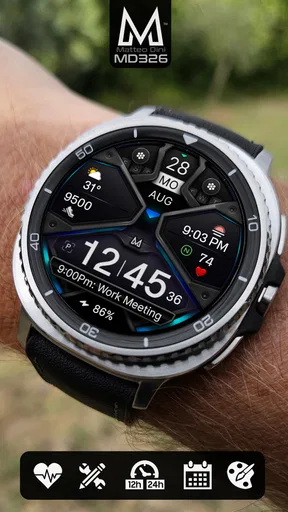
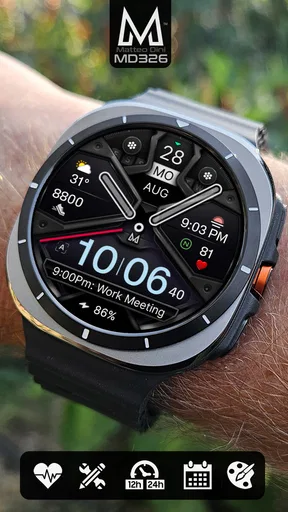
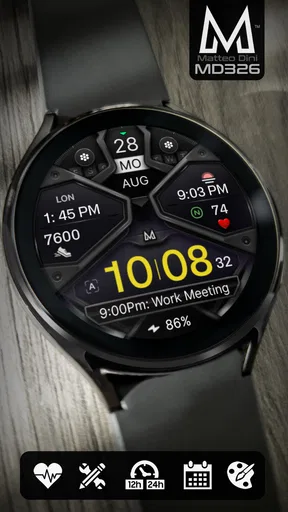
 Analysis by AppCompare
I find watch-face apps most useful when they make a watch feel more personal without making everyday use harder. MD326 3D Modern Watch Face is aimed at Wear OS owners who want a more dimensional digital look and room to tailor the display. My main advice is to approach it as both a design choice and a small setup task: the face can only show the details that your watch and chosen settings make available.
Where setup can feel less straightforward
A paid watch face can create a frustrating first impression if it appears on a phone but not on the watch, or if the watch keeps showing its previous design. That kind of mismatch does not necessarily mean the face itself is broken. Watch-face purchases and installation often involve both a phone companion flow and the watch’s own interface, so I would check each device rather than repeatedly tapping the same install button.
Before judging the look, I would also confirm that the watch is running Wear OS and that the watch is connected to the phone. A design made for Wear OS is not interchangeable with a face intended for another smartwatch platform. If the device is compatible but the new face is not immediately visible, checking the watch’s face selector is a more useful next step than assuming the app has failed.
There is also a practical expectation to set: customization can take a few minutes. I would not try to configure every option while rushing out the door. Start with the central appearance, then adjust the information you actually use. That keeps the first setup manageable and makes it easier to tell whether a particular choice is improving the face or merely making it busier.
Small checks before changing settings
My preferred setup routine is to begin with a simple baseline. Apply the face, look at it on the watch in ordinary indoor light, and check whether the time and the details you care about are easy to read at a glance. Then change one setting at a time. If several elements are altered together, it becomes harder to identify which choice made the display clearer—or less useful.
Think about the watch’s role before choosing what to emphasize. If you mainly glance at it during errands, a clean time display may matter more than filling every available area. If you use your watch to keep track of daily activity or appointments, information relevant to those routines may earn the space instead. A face that looks impressive in a setup screen can feel cluttered once you are checking it quickly while walking or carrying bags.
It is worth checking the available options directly on the paired devices rather than assuming every control will appear in the same place. Companion apps and watch interfaces can divide setup steps between them. If an option is not where you expected, return to the face’s own settings and the watch’s face controls before reinstalling anything. That simple check can save time and avoid disrupting a setup that is already mostly working.
Worth Reading Before You Choose

EA SPORTS FC Mobile 26 Is a Bigger Football Game, but It Takes Time

Flipboard Shows What News Apps Must Do Beyond the Feed

Switching to Android Auto Means Rethinking Your Driving Routine

Google Calendar Makes a Crowded Week Easier to Manage

Ludo King Makes the Most of the Minutes Between Plans

Baby Panda World Brings Quick Play to Modern Phones, but Its Game Library Feels Busy
Recovering a workflow without starting over
If the design is selected but something looks wrong, I would first reopen its settings and verify the choices that affect the visible layout. A complication can be unavailable or show different content depending on the watch and the apps installed. In that situation, choosing another available item or leaving that space unused is more sensible than repeatedly resetting the whole face.
If the new face does not appear after installation, I would check the watch’s face carousel and give the paired devices a moment to catch up. A brief connection interruption can make an install or settings change seem incomplete. Restoring the connection and revisiting the selector is a gentler recovery path than removing the app immediately. If the issue persists, a normal restart of the watch and phone is a reasonable general troubleshooting step, followed by checking the installation again.
I also recommend keeping a mental note of the settings that work for you before experimenting. Even without documenting every choice, changing one item at a time makes it easier to return to a readable arrangement. That is especially useful if you are testing a more colorful presentation and later decide that a calmer layout suits work or nighttime use better.
When the watch, not the face, is the bottleneck
Not every display or performance concern points to the watch face. The watch’s screen, system behavior, selected complications, and connection to the phone all affect what you see. If other faces also feel slow or fail to update, I would look at the watch and its connection before blaming this one. If only a particular piece of information is missing, the complication or the source app may be the more relevant place to check.
Battery expectations deserve the same careful approach. A visually detailed face may look demanding, but actual battery experience depends on the watch and how it is used. I would compare battery behavior over a normal day rather than drawing a conclusion from a short test, and I would avoid changing several watch settings at once if I want to understand what made a difference. The face should be judged in the context of the whole device, not in isolation.
For someone who relies on a specific data source, it is sensible to verify that source works on the watch before arranging the face around it. A layout cannot make an unavailable complication appear. This is a useful check for anyone buying a new face mainly to put a particular app or piece of information within easy reach.
Living with MD326 day to day
I use this section to consider how MD326 fits into an ordinary routine once the initial setup is done, especially whether its visual choices remain comfortable during quick glances rather than only looking appealing while customizing. I’d also think about keeping the display focused on the details I check most, so the face feels personal without turning a glance at the time into a search.
First impressions
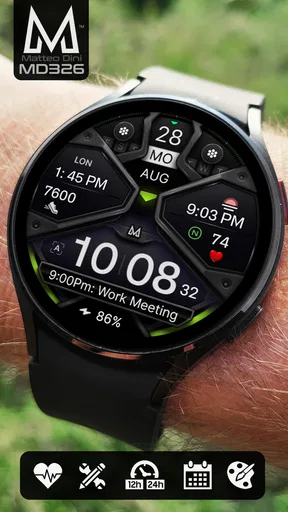
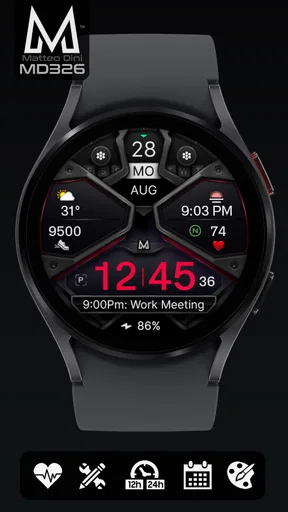
When I first installed the MD326 3D Modern Watch Face, I was instantly impressed by its sleek and dynamic design. It's like having a mini art piece on your wrist. The 3D elements are not just a gimmick; they truly add depth and a modern flair that stands out among the usual flat designs. The vibrant colors and intricate details are sure to catch the eye of anyone nearby.
User Experience
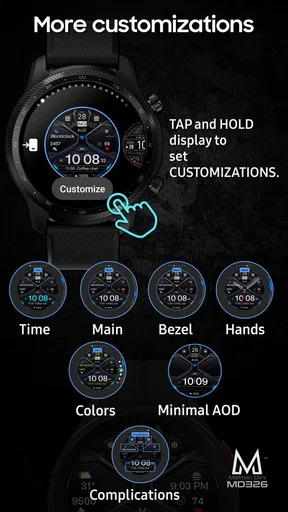
Now, let's talk about usability. This app isn’t just about looks—functionality is right at the forefront. Navigating through its settings is a breeze. I appreciated how intuitive it was to customize. You can tweak everything from the color schemes to the widget placements with just a few taps. The app makes it easy to personalize your watch face to suit your mood or outfit of the day.
Another cool feature is the battery efficiency. Often, visually rich watch faces drain the battery like nobody's business, but not this one. I was pleasantly surprised to find that my smartwatch's battery life wasn’t significantly impacted.
Customization Galore
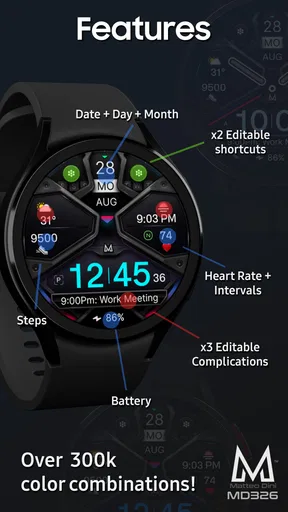
One of my favorite features is the customization options. The ability to change up the complications and widgets is super handy. Whether you want to display the weather, your step count, or calendar events, the options are right at your fingertips. Plus, it even supports third-party app integrations, which means you can have your favorite apps front and center.
MD326 3D Modern Watch Face also offers a variety of themes. From minimalist to funky, there’s something for everyone. The app updates regularly with new themes and features, ensuring you never get bored with your smartwatch’s appearance.
Performance
Performance-wise, I found the app to be smooth and responsive. Switching between different watch faces and settings was seamless, with no lag or freezing, which is crucial for a smooth user experience. The developers have clearly put a lot of effort into optimizing this app for various smartwatch models.
Who will get the most from it
I see this as a good fit for someone who enjoys making a smartwatch feel like their own rather than treating the display as a fixed utility panel. The visual depth gives the watch a more distinctive presence, while the ability to adjust the displayed information helps it serve a daily routine too. Matteo Dini MD ® Watch Faces focuses on watch faces, and this design belongs to the personalization side of Wear OS rather than being a general-purpose phone app.
A realistic use case is a weekday commute: I might choose a restrained color arrangement and keep the most useful glanceable details visible, then check the watch without pulling out my phone. Later, I could make the appearance livelier for a casual evening. The value is not that the face changes my routine; it is that I can shape its visual character around the way I already use the watch.
It is less suitable if you want a completely plain display, do not care about visual customization, or prefer to avoid paid faces. The app costs $1.99, so I would decide whether its particular look appeals to me before buying rather than expecting the price alone to guarantee a better experience. Its Everyone age rating makes it broadly appropriate, but the real deciding factor is whether this style and its options suit your watch.
How it compares with simpler watch faces
The usual alternative is to stick with a face already included with the watch. That is often the sensible choice if you want the fewest setup steps or a familiar, understated screen. A simpler face may also be easier to scan if you dislike decorative depth. MD326’s appeal is more specific: it offers a more expressive presentation, so the trade-off is personal style and customization versus the clean predictability of a basic option.
Compared with choosing a different third-party face, I would focus less on the number of options and more on whether the design remains readable in your real routine. A crowded arrangement can technically show more, yet slow down the quick glance that makes a watch useful. I would start with only the details I genuinely check, then add another only if there is a clear reason. That keeps the visual treatment from competing with the time.
One non-obvious tip is to treat customization as a small hierarchy exercise. Decide what must be noticed first, what is useful but secondary, and what can be removed. This is more effective than trying to fill every area. Another is to keep a workday arrangement visually calmer and reserve stronger colors for a setting where quick readability is less important. That way, the face remains personal without making every glance feel busy.
What to expect before choosing it
The app is listed at an average of 4.4 from around 1.2 thousand ratings, with roughly 222 written reviews and more than 10 thousand installs. Those figures suggest a face with an established audience, but they cannot tell me whether its look will suit my own watch or which details I personally need. I would treat them as context, not a substitute for checking the design and compatibility for my device.
It was released on August 9, 2023, and the version available to you may affect the exact setup experience. For practical decisions, I would pay attention to what appears in the current installation and on the paired watch rather than relying on assumptions about a particular menu or layout. If you are unsure whether it is right for your device, confirm that you use Wear OS and review the purchase and installation flow before committing.
People often wonder whether they need to use every complication or theme to get value from a customizable face. I would say no: the strongest setup may be a small selection that keeps the display legible. Others may wonder whether a missing item means the face is malfunctioning. Since complications depend on the watch and the relevant apps, checking those sources first is a more useful response than immediately reinstalling the face.
Conclusion
In conclusion, if you’re on the hunt for a watch face that combines aesthetics with functionality, look no further. The MD326 3D Modern Watch Face is a top-tier choice for anyone wanting to elevate their smartwatch game. It’s a beautiful blend of art and technology, offering a personalized touch that’s both stylish and practical. Trust me, your wrist will thank you!
Ready to give your smartwatch a makeover? You can download it now and dive into a world of endless possibilities. Happy customizing!
Pros
- Customizable color themes enhance personalization.
- Smooth performance with minimal battery drain.
- Intuitive interface for easy navigation.
- Compatible with most Android smartwatches.
- Real-time health tracking integration.
Cons
- Limited free features; premium unlocks needed.
- Occasional sync issues with older devices.
- No iOS support
- Android only.
- Some users report infrequent app crashes.
- Requires regular updates for optimal performance.
FAQs for MD326 3D Modern Watch Face
What features does the MD326 3D Modern Watch Face offer?
The MD326 3D Modern Watch Face provides a visually stunning display with customizable color schemes and backgrounds. It includes essential features like step tracking, heart rate monitoring, and weather updates. Users can also personalize complications to display information such as battery life and calendar events, making it both a stylish and functional choice.
Is the MD326 3D Modern Watch Face compatible with all smartwatches?
The MD326 3D Modern Watch Face is specifically designed for smartwatches running Wear OS by Google. It is essential to check your device's compatibility before downloading. If your smartwatch supports third-party watch faces and runs on Wear OS, it should work seamlessly. However, it is not compatible with Apple Watch or other operating systems like Tizen.
How easy is it to customize the MD326 3D Modern Watch Face?
Customization is straightforward and user-friendly. Users can easily change colors, adjust background designs, and select from a variety of complications to display on the watch face. The app provides an intuitive interface, allowing users to personalize their watch face to suit their style and preferences without requiring technical expertise.
Does the MD326 3D Modern Watch Face affect battery life?
The MD326 3D Modern Watch Face is designed to be energy efficient, but like any graphic-intensive watch face, it may slightly impact battery life. Users can mitigate this by adjusting brightness settings and limiting the number of active complications. Regular updates also help optimize performance and reduce battery usage.
Are there any costs associated with downloading the MD326 3D Modern Watch Face?
The MD326 3D Modern Watch Face is available for a one-time purchase in the app store. While some features may be accessible for free, unlocking the full range of customization options typically requires a paid version. Be sure to check the app store listing for the latest pricing and any available discounts.


